Freight Booking Module



Overview
Jules AI needed a way for its operations team to manage freight bookings, creating new bookings, tracking their status, and reviewing shipment details, inside a single, fast-moving workflow. I owned the design of this module end-to-end, from the dashboard that gives users a snapshot of booking activity down to the detail panel for a single shipment.
The Problem
Freight booking operations involve a lot of moving, structured data: multiple bookings in flight at once, each with its own status, shipment details, and required actions. The core design challenge was fitting this density of operational data into an interface that stayed fast and scannable, without forcing users to navigate away from their working context every time they needed to check or update a booking.
Process
Understanding the workflow. Before designing any screens, I mapped out how a booking actually moves through its lifecycle, from creation, through status changes, to completion, and who touches it at each stage. This shaped the structure of the whole module more than any individual screen did.
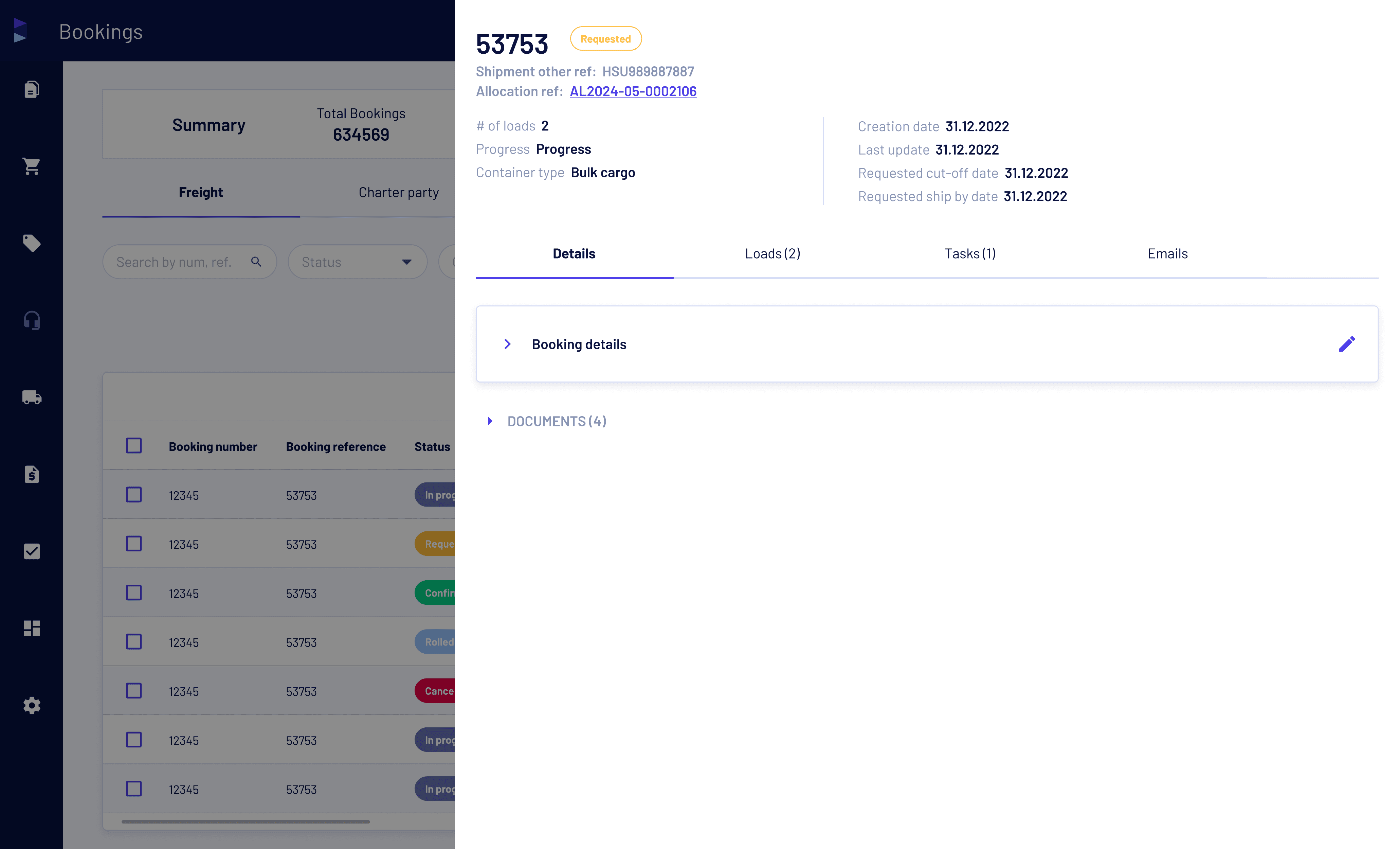
Structuring the information. I made an early call on what belonged on the main booking table versus what belonged in a dedicated detail view. The table needed to support fast scanning across many bookings at once; anything that required deeper context went into the detail side panel instead.
Designing the core flows. With the structure set, I designed:
A KPI dashboard giving an at a glance view of booking activity
A booking table with in-line status indicators and column level actions
A detail side panel for reviewing an individual booking without losing table context
A new booking creation flow
Status change workflows for updating a booking's state
In-app notifications to keep users informed of changes without needing to actively check

Key Design Trade-offs
Side panel vs. full-page detail view. A full-page view would have given more room per booking, but it would have pulled users out of the table entirely for every lookup. I chose a side panel so users could review a booking's details while staying anchored in the table, a better fit for an operations workflow where people are cross-referencing multiple bookings in a session.
Dropdown-driven status changes vs. modals. Status updates are one of the most frequent actions in the module. I used dropdown-driven updates directly in the table rather than opening a modal for each change, cutting the number of clicks for a high-frequency action at the cost of slightly less confirmation friction, a trade-off worth making given how often the action gets repeated.

Collaboration
This wasn't a solo design exercise. I worked with Product to prioritize what data earned a place on the table versus the detail panel, and with Engineering early in the process to make sure the interaction patterns, particularly the in-line dropdown status changes, were feasible against the existing data structures before I finalized them. Designing alongside engineering constraints from the start meant fewer surprises at handoff.
Outcome
The freight booking module shipped as a core product feature, giving the platform users a single workflow to create, track, and update bookings without losing context or switching views.