Voluntary Life Insurance Enrollment Experience


Overview
This design challenge was based on a realistic employee benefits scenario.
An employee at a mid-sized company receives an email during open enrollment inviting them to enroll in voluntary life insurance. They have seven days left before enrollment closes, have never purchased insurance independently, and need to complete eligibility questions, choose coverage, and submit their application.
The experience also needed to account for users who may leave midway and continue later on another device.
The Challenge
Insurance enrollment is often associated with:
Complex terminology
Long forms
Decision fatigue
High abandonment rates
Low confidence among first-time users
The goal wasn't simply to design six screens.
The challenge was to make an unfamiliar financial decision feel approachable, while reducing friction and encouraging completion.
Goals
The experience should enable users to:
Understand what they're enrolling in.
Complete enrollment quickly on mobile.
Add spouse coverage if needed.
Resume the process if interrupted.
Feel confident before submitting.
Design Principles
I established five principles before designing.
1. Reduce Anxiety
Assume the user has little to no insurance knowledge.
Replace jargon with plain language and provide context before asking for information.
2. Progressive Disclosure
Instead of presenting long forms, reveal information one step at a time.
This reduces cognitive load and keeps users focused on a single decision.
3. Mobile First
Every interaction was designed around thumb-friendly navigation, large touch targets, and minimal scrolling.
4. Confidence Over Speed
Users should feel certain about their choices before submitting.
This influenced the review screen and simplified coverage selection.
5. Design for Interruption
Because the brief stated users may abandon the journey, the flow prioritizes progress saving and simple re-entry.
User Flow
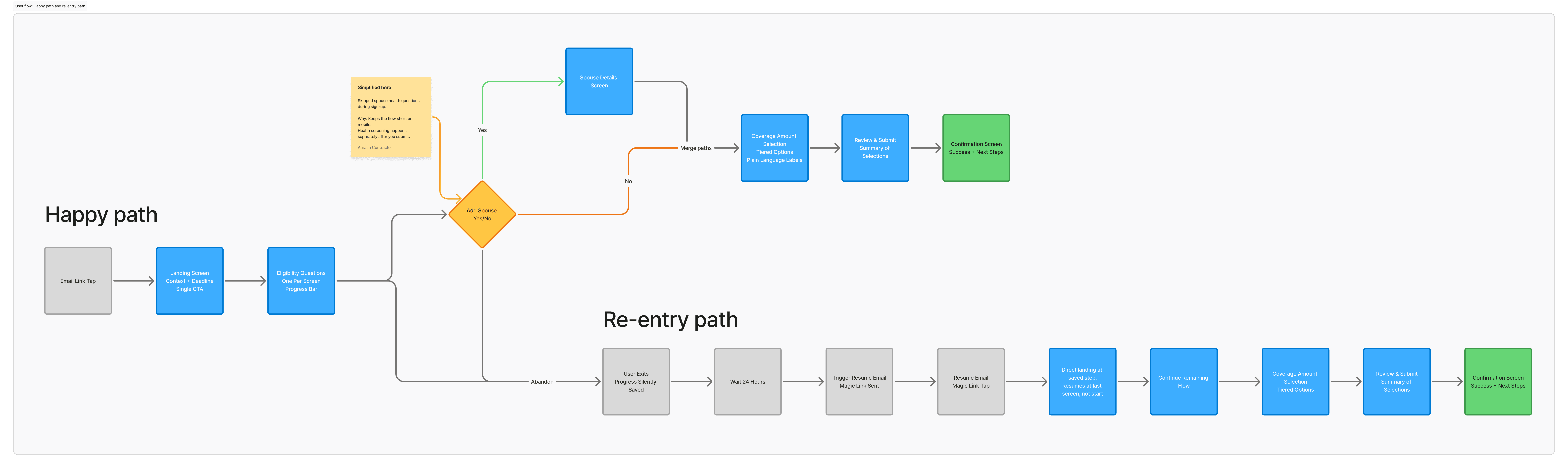
The enrollment journey was intentionally kept linear. To address interruptions, I introduced a secondary flow where users returning after leaving the application are taken directly to the last completed step rather than restarting the process. This reduces frustration and improves completion rates.
Key UX Decisions
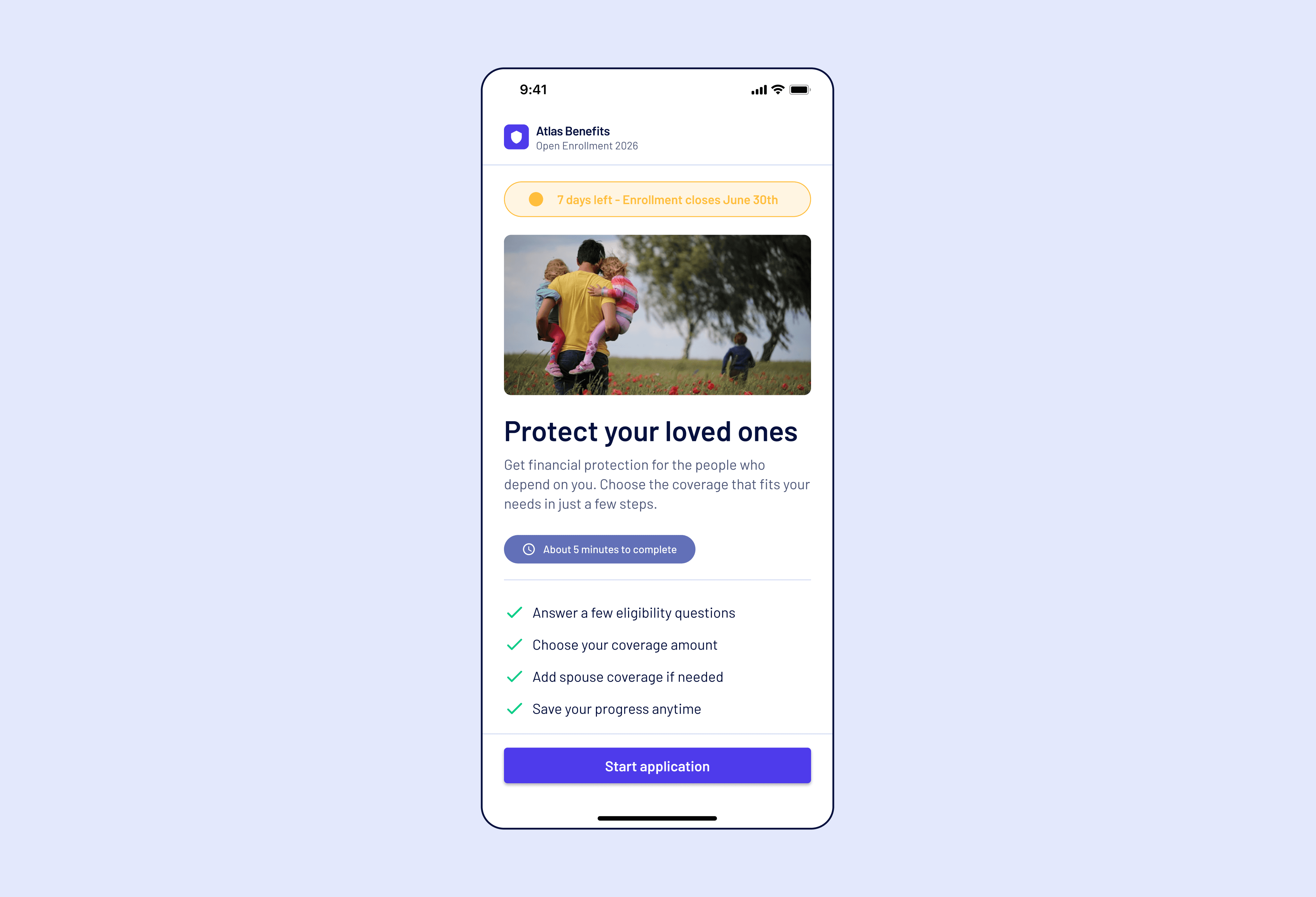
1. Landing Screen
Instead of immediately asking users to begin filling forms, the first screen explains:
what life insurance is
estimated completion time
enrollment deadline
ability to save progress
This sets expectations before requesting action.
2. One Eligibility Question Per Screen
Rather than displaying multiple questions simultaneously, I limited the experience to one primary question.
Benefits:
lower cognitive load
easier interaction on mobile
better completion rates
clearer progress
3. Optional Spouse Coverage
Instead of asking every user for spouse information, I introduced a Yes/No decision.
Only users selecting "Yes" see additional fields.
This keeps the primary flow shorter while supporting users with dependents.
4. Simplified Coverage Selection
Insurance products often use technical terminology.
Instead, I grouped coverage into clear tiers using plain language and monthly premiums.
Example:
Basic Protection
Standard Protection (Recommended)
Enhanced Protection
This helps users compare options without needing insurance expertise.
5. Review Before Submission
Before confirming enrollment, users see a complete summary of:
eligibility
spouse selection
coverage amount
monthly premium
Each section includes an Edit option, reducing anxiety around making mistakes.
6. Confirmation
The final screen doesn't simply display success.
It explains what happens next:
confirmation email
application review
expected next steps
Providing closure helps users feel confident that their enrollment was completed successfully.
Trade-off
The biggest design trade-off was choosing multiple small steps instead of a single long form.
While this introduces more taps, it significantly reduces cognitive load and makes the experience feel shorter.
Given that purchasing insurance is a high-consideration decision, I prioritized confidence and completion over minimizing clicks.
Re-entry Experience
The brief specifically mentioned that users may return later on another device.
To support this, I designed a secondary flow where:
progress is automatically saved
users receive a resume link
they continue from their last completed step
This removes the frustration of restarting lengthy forms.
Outcome
The final solution delivers:
A guided six-step enrollment experience
Reduced cognitive load through progressive disclosure
Optional branching for spouse coverage
Simplified coverage comparison
Clear review and confirmation
Seamless re-entry for interrupted sessions
The experience balances business requirements with user confidence, creating a flow that feels approachable despite the complexity of insurance enrollment.
What I'd Improve Next
With more time, I would validate the design through usability testing.
Specifically, I would measure:
where users hesitate during enrollment
whether the coverage options are easily understood
if the review screen increases confidence before submission
whether the resume flow effectively reduces abandonment
Those insights would guide future iterations and help optimize both completion rates and user satisfaction.